Thumbnails for mp4 In MS Windows Explorer
23Sep07
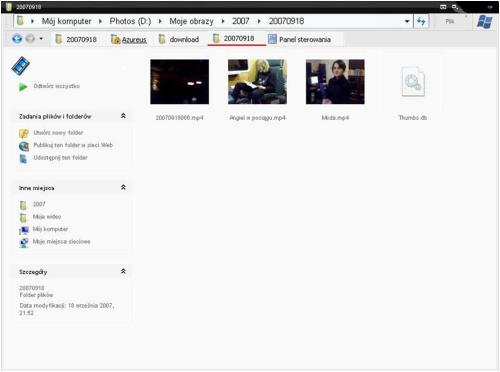
I’ve been searching for a long time for a trick that will allow me to show thumbnails of mp4 files and today I finally found it!
The software you need to this trick is called CCCP (yes, like the old good Russia 😉 ) and it’s available from http://www.cccp-project.net/
Here you see my beautifully personalized windows explorer
Filed under: Informatics, Problems | 9 Comments
Tags: explorer, microsoft, mp4 problem, thumbnails, vista, windows, xp
Recent Comments
 I was listening…
- An error has occurred; the feed is probably down. Try again later.


 Ranza Research
GREAT…!!!!
This is fuck’n great….
Thank you very very very much…….!!!!
Thanks! Also been looking for this a long time!!
Hey, there is an other way around
install any codecs You want
aand then edit Your Registry
create
HKEY_CLASSES_ROOT\.MP4
in there create new key – name it “ShellEx”
right click the created key and again “new”==> key
enter {BB2E617C-0920-11d1-9A0B-00C04FC2D6C1}
then click the created key and “SET VALUE”
set it to
{7376D660-C583-11d0-A3A5-00C04FD706EC}
VOILA!
works for all other video extensions – values/key names all the same
checked with K-Lite codec pack
OOOPS mistake!!!
last value should be
{c5a40261-cd64-4ccf-84cb-c394da41d590}
the one I gave before is for IMAGES not videos
To Ranza the orginal poster,
The CCCP codec package was great, thank you very much for the research and hyperlink. Cant belive I am just getting round to this little gem, But I had to find somthing…..
As you may know MP4 Files are growing very fast, in fact where-as FLV used to be the standard some sites are looking for MP4 to be the prefered format method.
To Hejwi there is some very nice registy work-arounds in your post.
( I have not tried yet as CCCP worked straight away for me.But I have saved your research notes, and its great to know that this method exists as well as CCCP.Thank you for your posting and research as well.)
I all the time emailed this website post page to all my friends,
since if like to read it next my links will
too.
I will immediately take hold of your rss feed as
I can’t find your e-mail subscription link or newsletter service. Do you have any? Please permit me realize so that I may just subscribe. Thanks.
Hi there, I do think your blog could be having web browser compatibility issues.
Whenever I look at your site in Safari, it looks fine but when opening in I.E., it’s got
some overlapping issues. I just wanted to provide you with a quick heads up!
Apart from that, excellent site!
Evaluation the amortization desk to see how a lot interest and
principal is paid with every fee and the full curiosity that will probably
be paid on the loan whether it is paid as scheduled.